Howdy, Stranger!
It looks like you're new here. If you want to get involved, click one of these buttons!
Categories
In this Discussion
Hai / Bye: syntactic ambiguity in Valence

- Title: Hai / Bye
- Author: Daniel Temkin
- Language: Valence
- Year of development: 2026
Picking up from the main book thread for Forty-Four Esolangs, we'll build a short program in Valence to show how syntactic ambiguity works in the language. It will be the Hai / Bye program, presented in full at the end of this post.
In English, we can form sentences like "Billy saw the group with the telescope," which resolve in two different ways: the group has the telescope, or Billy is looking through the telescope at the group.
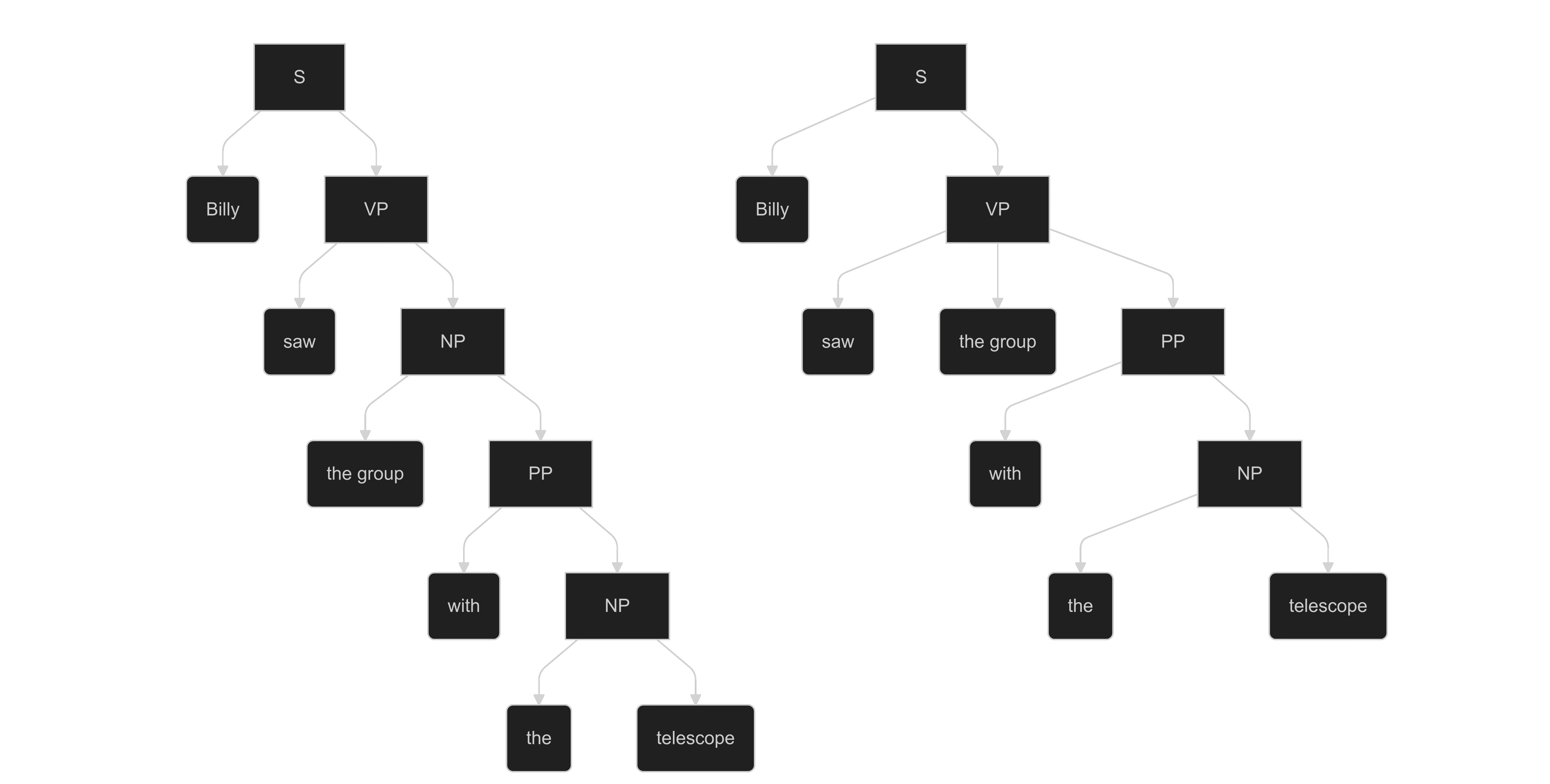
Valence brings to programming this same structural ambiguity, where a line of code can hold multiple interpretations. When running the program, the interpreter forks the program at each ambiguous statement, allowing all versions of the program to play out in parallel. There is no single "correct" reading. This can be tried using the online interpreter / code editor.
Each Valence sign can be a command, an expression, a variable, or a literal value (by default, an octal digit). Its reading is determined by context: whether it is treated as a command vs. an expression, and how many parameters it is given.
Monads (signs that take one parameter), are written prefix. Using 𐅶 as example, it is written 𐅶x for parameter x. When a sign has two parameters, it is written infix,x𐅶y.
Each possible syntax tree for a line of code is evaluated; if we want to lock down these readings, we can explicitly mark a set of signs as a parameter by surrounding them with square brackets.
For example, take the line of code 𐅶𐅶𐅶:

Either the first sign is the command and it's a while loop, 𐅶[𐅶[𐅶]] (these are marked in red as there's a syntax error: the loop is never closed). Or the middle sign is the command, and it's an add/assign (+=), [𐅶]𐅶[𐅶]. The interpreter shows us a version of the code with brackets marking all parameters, with syntax highlighting displaying the command in green.
However, we don't have only two readings but four. There's a second form of ambiguity, because the third sign can be read as either a variable or a literal value (the octal digital zero). We use other signs to explicitly choose one or the other:
𐅶𐅶[𐅾𐅶] locks it down to mean the variable 𐅶, while 𐅶𐅶[𐆇𐅶] indicates the value 0. These are just one use of 𐅾 and 𐆇, which themselves have many different readings.
Here is a longer sample that relies on that second form of ambiguity, between literal vs. variable name:
[𐅶]𐆉𐆇𐆇
[𐆁]𐆉[𐅶]
𐅾[𐆇[[𐅾𐆁]𐅶[𐆇𐅻]]]
[𐆊]𐆉[𐆇𐅶]
𐆉[𐅻]
[𐆉]𐅶[𐆇𐅾]
𐆉[𐆊]
[𐆉]𐅶[𐆇𐅾]
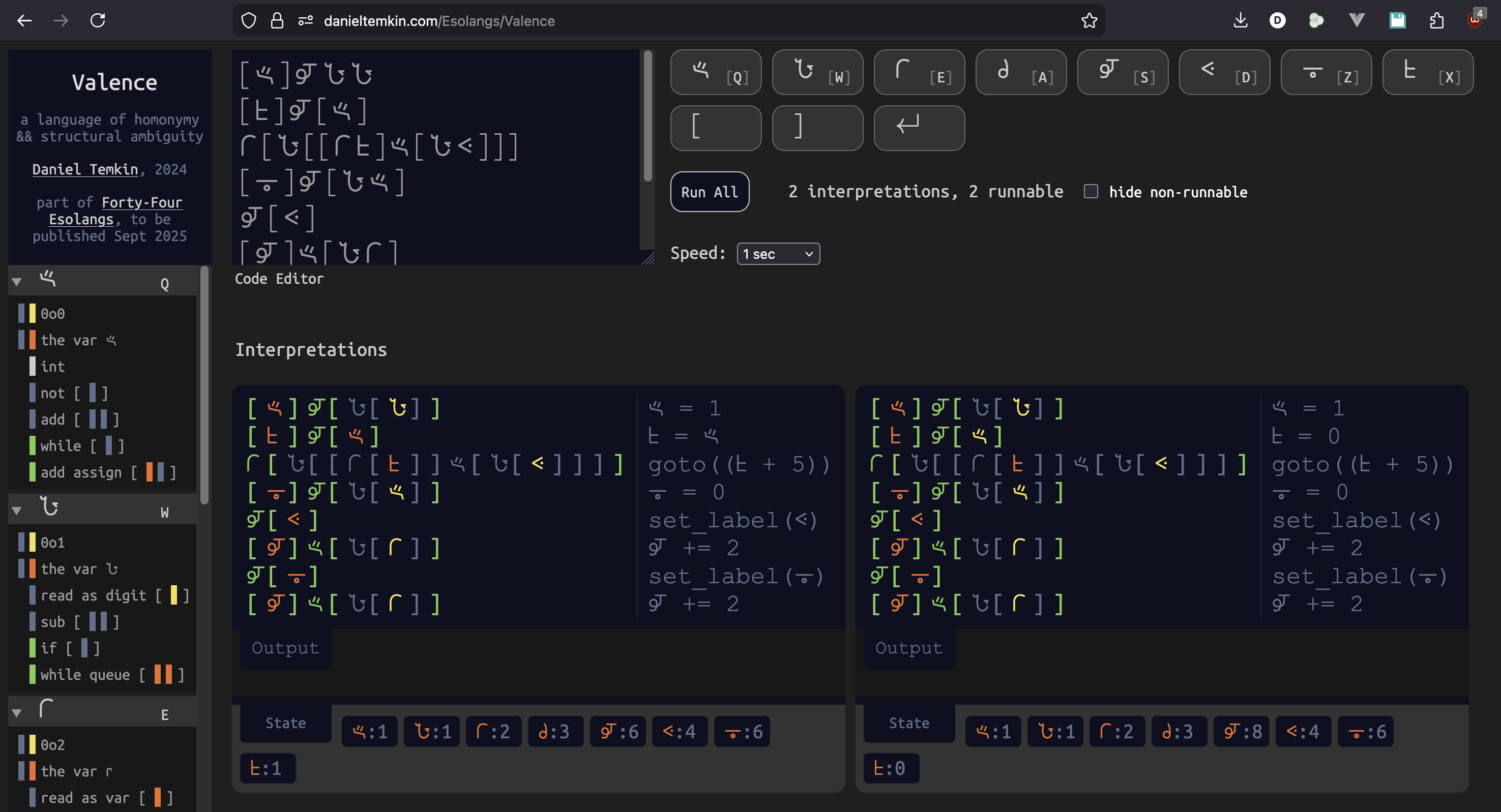
When run in the editor, it has two interpretations, which execute in parallel:
video:
Below each of the two Interpretations are a State box, showing the final state of all Valence variables for that run. There are eight variables in Valence, and each corresponds to one of the signs used in the language. In the first interpretation, 𐆉 ends with the value 6, while in the right, it's given the value 8. Next to each line is psuedo-code showing how the interpreter reads it. For the left version, we have this:
𐅶 = 1
𐆁 = 𐅶
goto((𐆁 + 5))
𐆊 = 0
set_label(𐅻)
𐆉 += 2
set_label(𐆊)
𐆉 += 2
In lines 1 and 2, we assign the value 1 to 𐆁, followed by a goto expression. While Valence allows for structured sequencing with a while loop, it also has goto, which works in terms of labels. On line 5, we set the label 𐅻 (which literally sets the value of 𐅻 to 4 -- not 5, as line numbers are zero-based in Valence). The goto is not to either of those labels, but to the expression (𐆁 + 5). At that point in the program, 𐆁 has the value 1, so this resolves to 6. 6 is an alternate meaning of the symbol 𐆊, so we jump to the label 𐆊.
The right interpretation has a different reading for line 2: 𐆁 = 0. This is because, in the second line ([𐆁]𐆉[𐅶]), 𐅶 is read as both a variable and a literal (the octal value 0o0). As the literal value, we calculate a different label to jump to,𐅻, giving us the value 8 instead of 6. The syntax highlighting helps us read this, as variables are marked in orange and literals in yellow.
NOTE: If an evaluated expression is larger than eight, it mods eight (takes the remainder when divided by 8) to find the label to jump to. If two lines are labeled the same way, it jumps to the closest one
We can build on this to create longer programs that have multiple meanings. Here is the complete Hai/Bye program which extends our existing program, printing either "Hai" or "Bye" to the screen:
[𐅶]𐆉𐆇𐆇
[𐆉]𐆉[𐆇𐆇]
[𐆁]𐆉[𐅶]
𐅾[𐆇[[𐅾𐆁]𐅶[𐆇𐅻]]]
𐆉[𐅻]
[𐆉]𐅶[[𐆇𐅶]𐆇[𐆇𐅾]]
𐆉[𐆊]
[𐆋]𐆉[[𐅻]𐆉[[[𐅻[𐅻[𐆇𐆇]]]𐅶[𐆇𐅻]]𐅶[[𐅾𐆉]𐆁[𐆇𐆋]]]]
[𐅶]𐆉[𐅾𐆋]
[𐆋]𐅶[𐅻[𐆇𐅻]]
[𐆋]𐅶[[𐆇𐅶]𐆇[[[𐅻[𐆇𐆇]]𐅶[𐆇𐆁]]𐆁[𐅾𐆉]]]
[𐅶]𐅻[𐅾𐆋]
[𐆋]𐅶[[𐆇𐅶]𐆇[𐆇𐆊]]
[𐆋]𐅶[[[𐅻[𐆇𐆇]]𐅶[𐆇𐆊]]𐆁[𐅾𐆉]]
[𐅶]𐅻[𐅾𐆋]
𐆋[𐅾𐅶]
Below is the interpretation of that program. The "Hai" and "Bye" differ only in how line 3 is interpreted:
𐅶 = 1
𐆉 = 1
𐆁 = 𐅶 (for Bye) | 𐆁 = 0 (for Hai)
goto((𐆁 + 0o5))
set_label(𐅻)
𐆉 += (0 - 0o2)
set_label(𐆊)
𐆋 = cast(char, (0o105 + (𐆉 * 0o3)))
𐅶 = 𐆋
𐆋 += 0o50
𐆋 += (0 - (0o17 * 𐆉))
𐅶 APPEND 𐆋
𐆋 += (0 - 0o6)
𐆋 += (0o16 * 𐆉)
𐅶 APPEND 𐆋
print(𐅶)
On line 2, we set 𐆉 to 1. In the Bye version of the program, we don't skip line 7, which subtracts 0o2 (octal 2), giving us -0o1. This single change affects all the following calculations.
On line 9, we assign to 𐆋 0o105 + (0o3 * 𐆉), producing 'H' or 'B' depending on the value of 𐆉. This is then copied to 𐅶, which will become our final output string. On lines 11 and 12, we assign𐆋 += (0o50 + (-0o17 * 𐆉)), getting us from 'H' to 'a' or from 'B' to 'y'. For the third character, 𐆋 += -0o6 + (0o16 * 𐆉). Each character is appended to 𐅶, which is printed on the final line of the program.
Comments
Daniel, your English example of a tactic ambiguity was really thought-provoking for me. It reminded me of something that Jessica Pressman, Mark Marino and I looked at some years ago in the source code for William Poundstone's Project For Tachistoscope - the concept of garden path sentences. In Project the purely linear high speed word-at-a-time text forces human readers to build the syntax tree of the sentence on-the-fly and under time pressure, and they may become more susceptible to building a parse that turns out to be a dead-end. In the classic garden path example "The horse ran past the barn fell," the common branching mistake happens at identifying the second word "ran" as the main verb, turning the eventual "fell" into a human parse-error.
This brings me back to the maintained parallel possibilities of Valence. Metaphorically, in the human garden-path sentence, the parse tree collapses on a bad token, and if the valid parse is deep enough then at first we cannot easily "go back" up the tree to find the mistake and generate a new parse. In Valence, by contrast, the parallel interpretations are always ever equal -- equally executed, and equally updated or expanded in the web interface as new tokens are typed. But, like garden path sentences, they can also collapse, where a new typed token causes the number of interpretations to suddenly drop to zero -- or to one.
So, for example
𐅾𐅾could be either goto(𐅾) or goto(2), but when we type𐅾𐅾𐅾the meaning collapses to one interpretation. This suggests to me that Valence is one of many possible languages with ambiguity -- some of which can only become more ambiguous as terms are added, and some of which can be more or less. Of these, some languages may have values or actions which are exclusively ambiguous -- they can only be expressed ambiguously, and never in unambiguous ways -- and some may have values or actions which can always be re-expressed unambiguously. The first thought we might relate to Kurt Gödel's incompleteness theorems, and the second to Turing completeness.I'm not actually what relationship different kinds of expressions in Valence have to ambiguity in this sense (of logic, or of computation). However I do find it interesting that, while Prompt 40 implies many potential Realizations such as Valence, Valence itself seems to imply the speculative existence of a family of closely related languages in ways that go beyond the Prompt.
Yes, Prompt 40 invites other possibities for a language, and the choices made in realizing it create a very different feel. My first draft of Valence used a (different) set of eight symbols, with more alternate readings for each, and the order they appeared in a line of code mattered less. With that lax a syntax, a line with only five signs could easily generate 10,000 interpretations, to be multiplied 10,000x by the next. If you're typing a new line of code and go a little too fast, your existing set of interpretations could explode quickly.
This final version limits the speed at which meanings proliferate, and one change was to allow fewer combinations of signs. Only two signs, 𐅾 and 𐆊, can sit alone on a line, as a single character. But any odd number of 𐆊 characters apart from one is invalid, because there's no single-parameter expression for 𐆊, and so no valid tree to describe it.
As an exercise, I tried more lengths of repeated 𐅾 characters:
𐅾 has only has two commands (top level elements in our syntactic tree): end block, and goto. End block won't take a parameter, so only the single 𐅾 matches this. All the others are some form of goto. And nearly all involve the variable 𐅾 (as opposed to its literal value of 0o2), since another use of 𐅾 is to mark reading as a variable. Alternately, it means division (when given two params), so we get long lines of 𐅾 dividing itself in more intricate combinations. These are two interpretations of 13 𐅾 signs:
From the psuedocode, it looks like the second interpretation is much shorter. But that reading makes heavy use of 𐅾 as var indicator, which happens repeatedly here for each of the two vars.
As for the behavior of a goto statement given a calculated value: the end result is modded by eight, and the instruction pointer would jump to the label whose numeric reading is equal to or, in the case of a non-integer result, closest to it.
Very interesting, Daniel. You mention some specific constraint you know on meaningful expressions, e.g. "Only two signs, 𐅾 and 𐆊, can sit alone on a line, as a single character. But any odd number of 𐆊 characters apart from one is invalid, because there's no single-parameter expression for 𐆊, and so no valid tree to describe it."
I wonder what the distributions look like if a naive system simply began generating an enumeration of all possible lines using Valence's set of Greek glyphs '𐅶𐆇𐅾𐆋𐆉𐅻𐆊𐆁' and checking only the number of interpretations per line (with 0 being a possibility). Given that there are only 8 characters, we would get the number of integers in base 8 for any number of digits (OEIS A052379. So 8^1 = 8 potential lines with one character (where only 𐅾 and 𐆊 compile), while 8^1 + 8^2 = 8+64 possible lines with one or two characters, +8^3, +8^4 ... and so forth. For example, using Python:
...we would expect to generate 37448 potential Valence lines of up to 5 characters, interpret each, and check the number of interpretations per line. I tried adapting this approach to a JavaScript file wrapped around a local copy of your online parser, and then binned the results by character length of the Valence input line (C) and the number of interpretations returned (I). The results for up to strings of length five look like this:
...so for example out of 32768 five-character Valence lines (row C=5), 2048 of them are invalid lines, 64 of them have exactly one interpretation... and the most common number of interpretations for a five-character line to have is nine (7672 possible lines have this many). The maximum ambiguity for a Valence line of length 1=1, 2=2, 3=4, 4=10, and 5=21. Only 72 lines of length five (~0.22%) have the maximum twenty-one different possible interpretations!
The "one-interpretation" column is particularly interesting to me because it suggests "AntiValence" -- an unambiguous remnant within an ambiguous language. For some reason there are exactly 64 such lines each for lengths 3, 4, and 5. Here are all the possible "AntiValence" line strings up to length 5:
1) 𐅾, 𐆊
2) 𐆉𐅶, 𐆉𐆇, 𐆉𐅾, 𐆉𐆋, 𐆉𐆉, 𐆉𐅻, 𐆉𐆊, 𐆉𐆁, 𐆁𐅶, 𐆁𐆇, 𐆁𐅾, 𐆁𐆋, 𐆁𐆉, 𐆁𐅻, 𐆁𐆊, 𐆁𐆁
3) 𐅶𐅾𐅶, 𐅶𐅾𐆇, 𐅶𐅾𐅾, 𐅶𐅾𐆋, 𐅶𐅾𐆉, 𐅶𐅾𐅻, 𐅶𐅾𐆊, 𐅶𐅾𐆁, 𐆇𐅾𐅶, 𐆇𐅾𐆇, 𐆇𐅾𐅾, 𐆇𐅾𐆋, 𐆇𐅾𐆉, 𐆇𐅾𐅻, 𐆇𐅾𐆊, 𐆇𐅾𐆁, 𐅾𐅾𐅶, 𐅾𐅾𐆇, 𐅾𐅾𐅾, 𐅾𐅾𐆋, 𐅾𐅾𐆉, 𐅾𐅾𐅻, 𐅾𐅾𐆊, 𐅾𐅾𐆁, 𐆋𐅾𐅶, 𐆋𐅾𐆇, 𐆋𐅾𐅾, 𐆋𐅾𐆋, 𐆋𐅾𐆉, 𐆋𐅾𐅻, 𐆋𐅾𐆊, 𐆋𐅾𐆁, 𐆉𐅾𐅶, 𐆉𐅾𐆇, 𐆉𐅾𐅾, 𐆉𐅾𐆋, 𐆉𐅾𐆉, 𐆉𐅾𐅻, 𐆉𐅾𐆊, 𐆉𐅾𐆁, 𐅻𐅾𐅶, 𐅻𐅾𐆇, 𐅻𐅾𐅾, 𐅻𐅾𐆋, 𐅻𐅾𐆉, 𐅻𐅾𐅻, 𐅻𐅾𐆊, 𐅻𐅾𐆁, 𐆊𐅾𐅶, 𐆊𐅾𐆇, 𐆊𐅾𐅾, 𐆊𐅾𐆋, 𐆊𐅾𐆉, 𐆊𐅾𐅻, 𐆊𐅾𐆊, 𐆊𐅾𐆁, 𐆁𐅾𐅶, 𐆁𐅾𐆇, 𐆁𐅾𐅾, 𐆁𐅾𐆋, 𐆁𐅾𐆉, 𐆁𐅾𐅻, 𐆁𐅾𐆊, 𐆁𐅾𐆁
4) 𐆋𐆋𐆉𐅶, 𐆋𐆋𐆉𐆇, 𐆋𐆋𐆉𐅾, 𐆋𐆋𐆉𐆋, 𐆋𐆋𐆉𐆉, 𐆋𐆋𐆉𐅻, 𐆋𐆋𐆉𐆊, 𐆋𐆋𐆉𐆁, 𐆋𐆋𐅻𐅶, 𐆋𐆋𐅻𐆇, 𐆋𐆋𐅻𐅾, 𐆋𐆋𐅻𐆋, 𐆋𐆋𐅻𐆉, 𐆋𐆋𐅻𐅻, 𐆋𐆋𐅻𐆊, 𐆋𐆋𐅻𐆁, 𐆋𐆊𐆉𐅶, 𐆋𐆊𐆉𐆇, 𐆋𐆊𐆉𐅾, 𐆋𐆊𐆉𐆋, 𐆋𐆊𐆉𐆉, 𐆋𐆊𐆉𐅻, 𐆋𐆊𐆉𐆊, 𐆋𐆊𐆉𐆁, 𐆋𐆊𐅻𐅶, 𐆋𐆊𐅻𐆇, 𐆋𐆊𐅻𐅾, 𐆋𐆊𐅻𐆋, 𐆋𐆊𐅻𐆉, 𐆋𐆊𐅻𐅻, 𐆋𐆊𐅻𐆊, 𐆋𐆊𐅻𐆁, 𐆊𐆋𐆉𐅶, 𐆊𐆋𐆉𐆇, 𐆊𐆋𐆉𐅾, 𐆊𐆋𐆉𐆋, 𐆊𐆋𐆉𐆉, 𐆊𐆋𐆉𐅻, 𐆊𐆋𐆉𐆊, 𐆊𐆋𐆉𐆁, 𐆊𐆋𐅻𐅶, 𐆊𐆋𐅻𐆇, 𐆊𐆋𐅻𐅾, 𐆊𐆋𐅻𐆋, 𐆊𐆋𐅻𐆉, 𐆊𐆋𐅻𐅻, 𐆊𐆋𐅻𐆊, 𐆊𐆋𐅻𐆁, 𐆊𐆊𐆉𐅶, 𐆊𐆊𐆉𐆇, 𐆊𐆊𐆉𐅾, 𐆊𐆊𐆉𐆋, 𐆊𐆊𐆉𐆉, 𐆊𐆊𐆉𐅻, 𐆊𐆊𐆉𐆊, 𐆊𐆊𐆉𐆁, 𐆊𐆊𐅻𐅶, 𐆊𐆊𐅻𐆇, 𐆊𐆊𐅻𐅾, 𐆊𐆊𐅻𐆋, 𐆊𐆊𐅻𐆉, 𐆊𐆊𐅻𐅻, 𐆊𐆊𐅻𐆊, 𐆊𐆊𐅻𐆁
5) 𐆋𐆋𐆉𐅾𐅶, 𐆋𐆋𐆉𐅾𐆇, 𐆋𐆋𐆉𐅾𐅾, 𐆋𐆋𐆉𐅾𐆋, 𐆋𐆋𐆉𐅾𐆉, 𐆋𐆋𐆉𐅾𐅻, 𐆋𐆋𐆉𐅾𐆊, 𐆋𐆋𐆉𐅾𐆁, 𐆋𐆋𐅻𐅾𐅶, 𐆋𐆋𐅻𐅾𐆇, 𐆋𐆋𐅻𐅾𐅾, 𐆋𐆋𐅻𐅾𐆋, 𐆋𐆋𐅻𐅾𐆉, 𐆋𐆋𐅻𐅾𐅻, 𐆋𐆋𐅻𐅾𐆊, 𐆋𐆋𐅻𐅾𐆁, 𐆋𐆊𐆉𐅾𐅶, 𐆋𐆊𐆉𐅾𐆇, 𐆋𐆊𐆉𐅾𐅾, 𐆋𐆊𐆉𐅾𐆋, 𐆋𐆊𐆉𐅾𐆉, 𐆋𐆊𐆉𐅾𐅻, 𐆋𐆊𐆉𐅾𐆊, 𐆋𐆊𐆉𐅾𐆁, 𐆋𐆊𐅻𐅾𐅶, 𐆋𐆊𐅻𐅾𐆇, 𐆋𐆊𐅻𐅾𐅾, 𐆋𐆊𐅻𐅾𐆋, 𐆋𐆊𐅻𐅾𐆉, 𐆋𐆊𐅻𐅾𐅻, 𐆋𐆊𐅻𐅾𐆊, 𐆋𐆊𐅻𐅾𐆁, 𐆊𐆋𐆉𐅾𐅶, 𐆊𐆋𐆉𐅾𐆇, 𐆊𐆋𐆉𐅾𐅾, 𐆊𐆋𐆉𐅾𐆋, 𐆊𐆋𐆉𐅾𐆉, 𐆊𐆋𐆉𐅾𐅻, 𐆊𐆋𐆉𐅾𐆊, 𐆊𐆋𐆉𐅾𐆁, 𐆊𐆋𐅻𐅾𐅶, 𐆊𐆋𐅻𐅾𐆇, 𐆊𐆋𐅻𐅾𐅾, 𐆊𐆋𐅻𐅾𐆋, 𐆊𐆋𐅻𐅾𐆉, 𐆊𐆋𐅻𐅾𐅻, 𐆊𐆋𐅻𐅾𐆊, 𐆊𐆋𐅻𐅾𐆁, 𐆊𐆊𐆉𐅾𐅶, 𐆊𐆊𐆉𐅾𐆇, 𐆊𐆊𐆉𐅾𐅾, 𐆊𐆊𐆉𐅾𐆋, 𐆊𐆊𐆉𐅾𐆉, 𐆊𐆊𐆉𐅾𐅻, 𐆊𐆊𐆉𐅾𐆊, 𐆊𐆊𐆉𐅾𐆁, 𐆊𐆊𐅻𐅾𐅶, 𐆊𐆊𐅻𐅾𐆇, 𐆊𐆊𐅻𐅾𐅾, 𐆊𐆊𐅻𐅾𐆋, 𐆊𐆊𐅻𐅾𐆉, 𐆊𐆊𐅻𐅾𐅻, 𐆊𐆊𐅻𐅾𐆊, 𐆊𐆊𐅻𐅾𐆁
This exercise of looking for interpretation distributions culminates here in a subset of the Valence possibility space -- unambiguous (as opposed to maximally ambiguous, et cetera). However none of this brute forcing or statistical reasoning as actually engaging with the computational logic of the language or asking why these patterns of interpretability arise as they do -- it is reading without reading....
This is fascinating angle, and one that didn't occur to me in designing the language. The AntiValence dialact is more limited -- probably not Turing Complete, although I can't rule that out. But it can be used for some simple programs. Here's an infinite loop that requests input from the user in each loop:
𐅶𐅾𐆋
𐆁𐆊
𐅾
The reason we can request input in AntiValence but not print is that the print command needs to know whether a sign is a literal or a variable, but input can only take a variable as a parameter.
As for the why, it's interesting how the arbitrary decisions (those that did not really have a deliberate "why") shape a language's character. In my Light Pattern language, where code is written in photographs, programs have a tendency to drift darker and darker (at least in the early version, which considered camera settings like aperture and shutter speed). In general, the longer a program was, the darker the photographs would become. The programmer would usually have to do a reset (with 222), marking the next photo as not having semantic value, to include a bright photo as a reset, allowing more code to be written.
The fact that Valence's lack of valid reading for some sign combinations removes the need for disambiguating brackets means that the language can't be expanded by adding another meaning to existing signs without risking that valid programs would accumulate new meanings. The exception is perhaps the nilads, the signs that take no parameters, and so can sit alone on a line.