Howdy, Stranger!
It looks like you're new here. If you want to get involved, click one of these buttons!
Categories
In this Discussion
Critical Code Studies Workbench

Inspired by the theme of vibe coding this week I decided to try to actualise a workbench for working in critical code studies projects. I used Claude Code to do the heavy lifting and I now have a usable version that can be downloaded and run on your computer. This is a version 1.0 so things may not always work correctly but I think that it offers a potential for CCS work that democratises access to the methods and approaches of CCS and makes for a (potentially) powerful teaching tool.
It uses a local LLM, Ollama, which you will need to download and install, but thats pretty easy (but should (!) be able to use an API key to talk to a more powerful LLM, if you want)
UPDATE: WEB VERSION NOW AVAILABLE TO TRY OUT
This is how the main page looks:
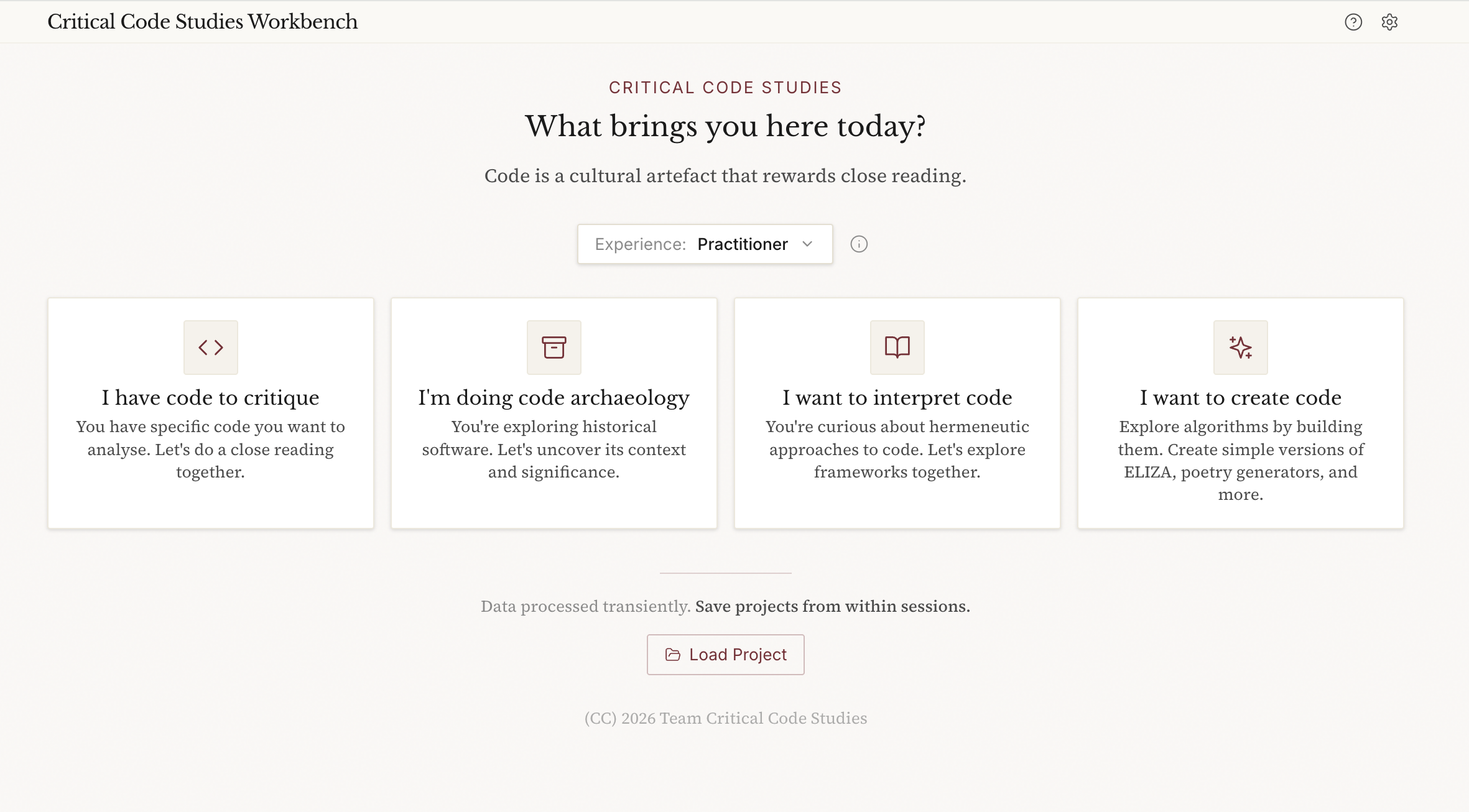
The Critical Code Studies Workbench facilitates rigorous interpretation of code through the lens of critical code studies methodology. It supports:
- Code critique - Close reading, annotation, and interpretation in the Marino tradition
- Hermeneutic analysis - Navigating the triadic structure of human intention, computational generation, and executable code
- Code archaeology - Analysing historical software in its original context
- Vibe coding - Creating code to understand algorithms through building
Software deserves close reading here is a tool to help us. The Workbench helps scholars engage with code as meaningful text.
Note that the CCS Workbench has a built in LLM facility. This means that you can chat to the LLM whilst code annotating, ask it to help with suggestions, give interpretations of the code, etc. whilst you are working. The other modes are more conversational (archaeology/interpretation/create) and allow a more fluid way of working with code and ideas. There is a quite sophisticated search for references whilst you are chatting in the latter three modes so you can connect to CCS literature (and wider) from within the tool.
The Workbench saves project files based on the mode you are in and you can open them from the main page and then it will put you back in the session where you left off. You can also export the session in JSON/Text/PDF for writing up in an academic paper, etc.
Features
Entry Modes
- I have code to critique: IDE-style three-panel layout for close reading with inline annotations
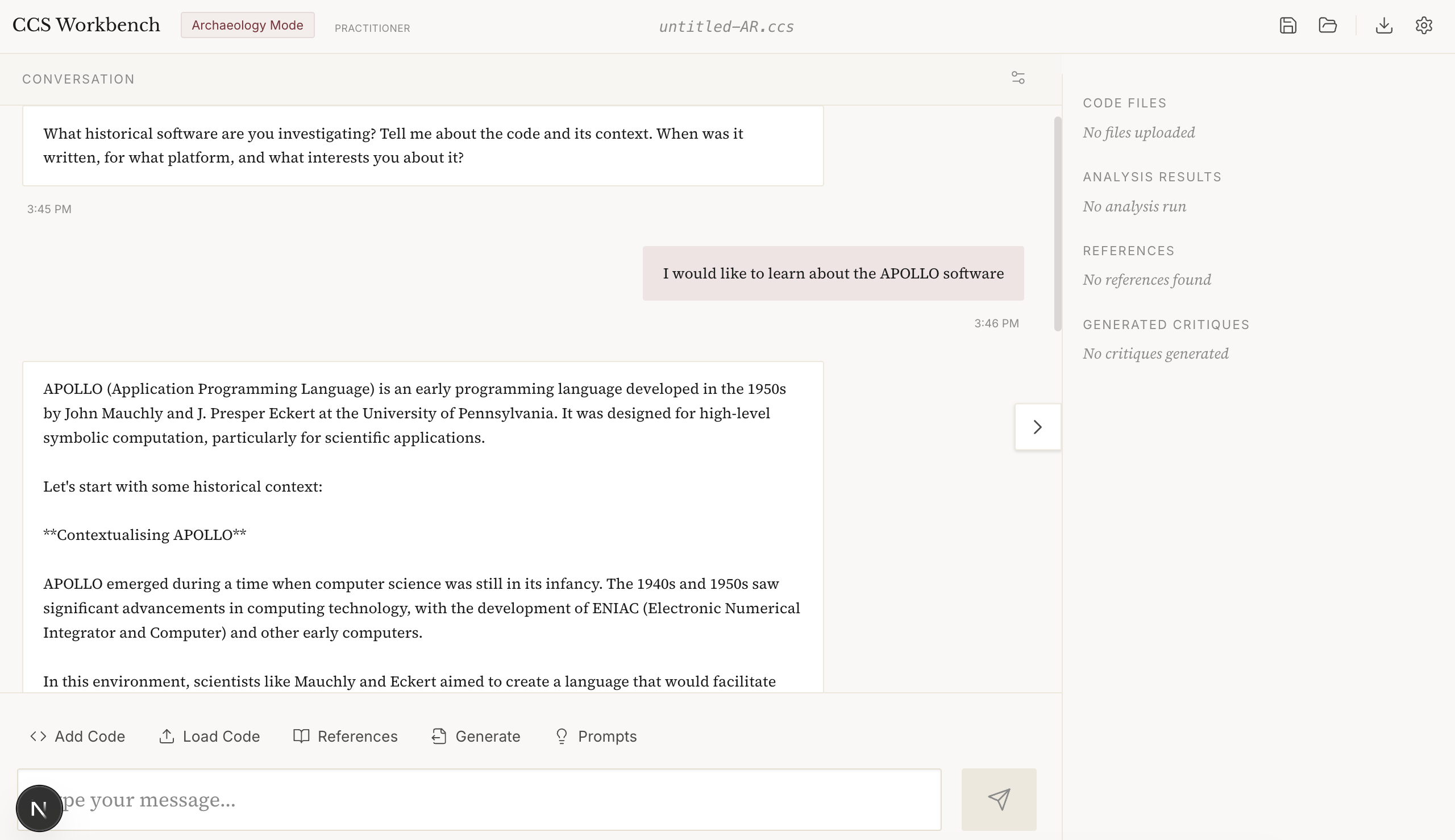
- I'm doing code archaeology: Exploring historical software with attention to context
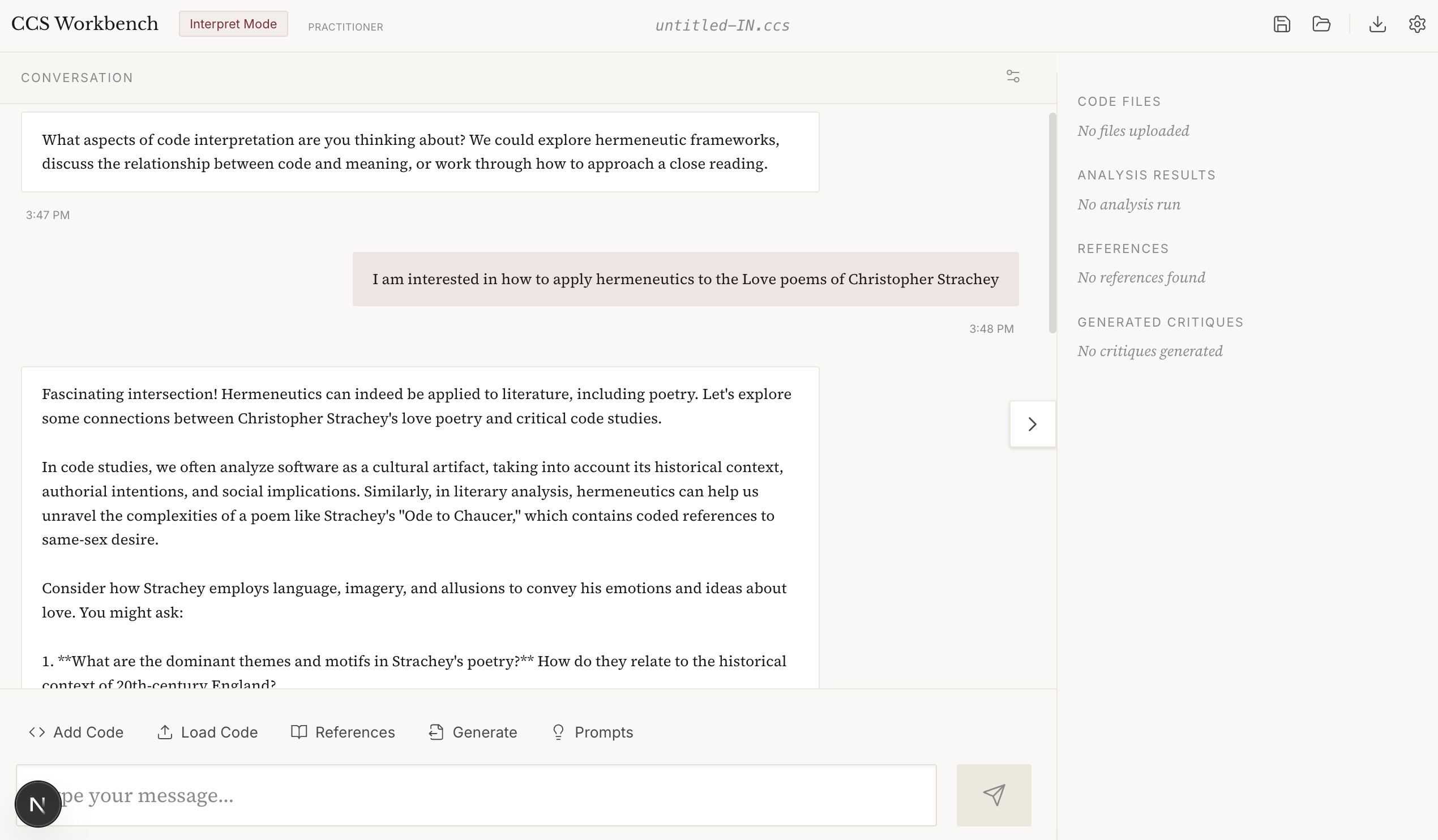
- I want to interpret code: Developing hermeneutic frameworks and approaches
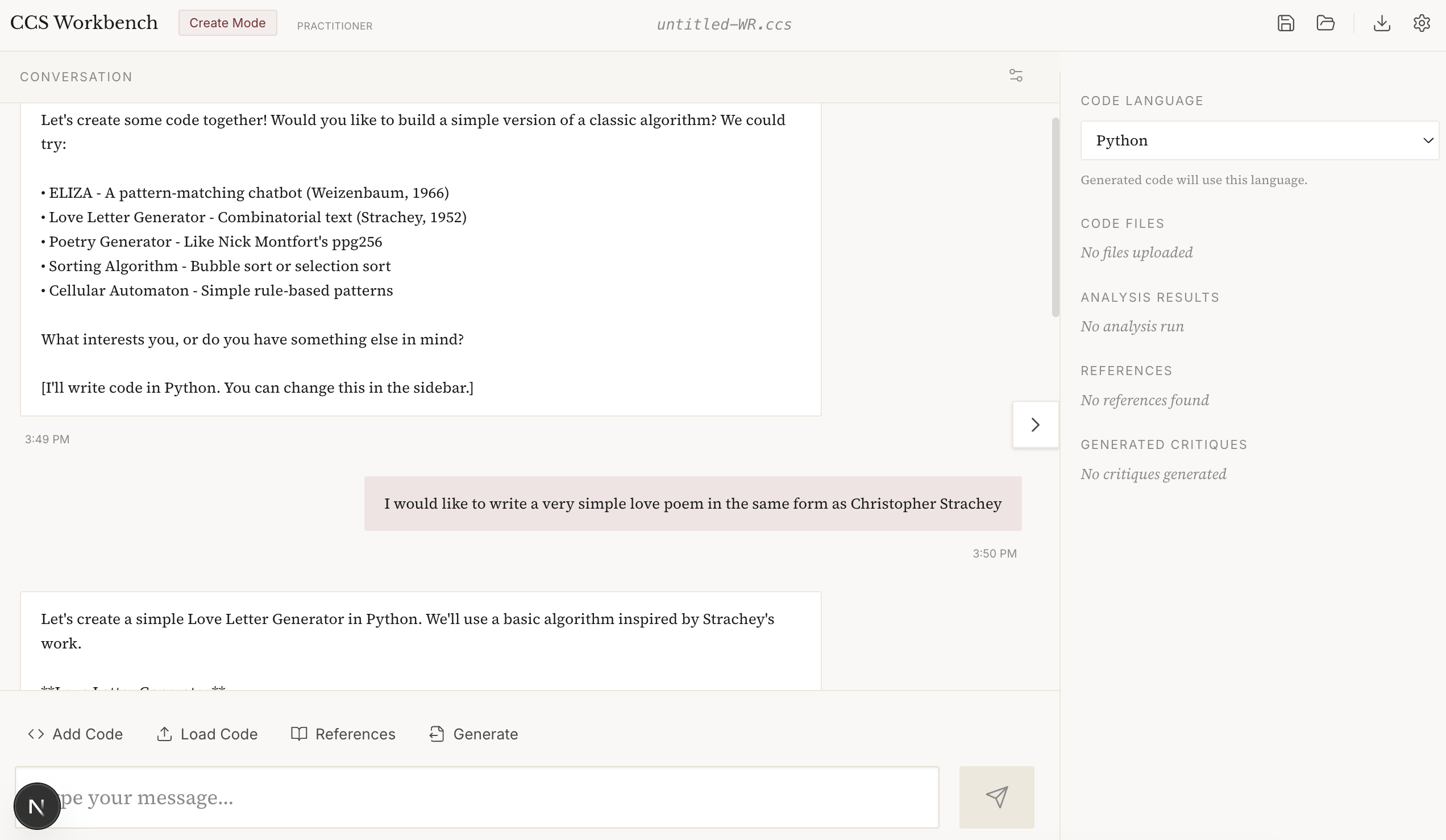
- I want to create code: Explore algorithms by building them (vibe coding)
Experience Levels
The assistant adapts its engagement style based on your experience:
- Learning: Explains CCS concepts, offers scaffolding, suggests readings
- Practitioner: Uses vocabulary freely, focuses on analysis
- Research: Engages as peer, challenges interpretations, technical depth
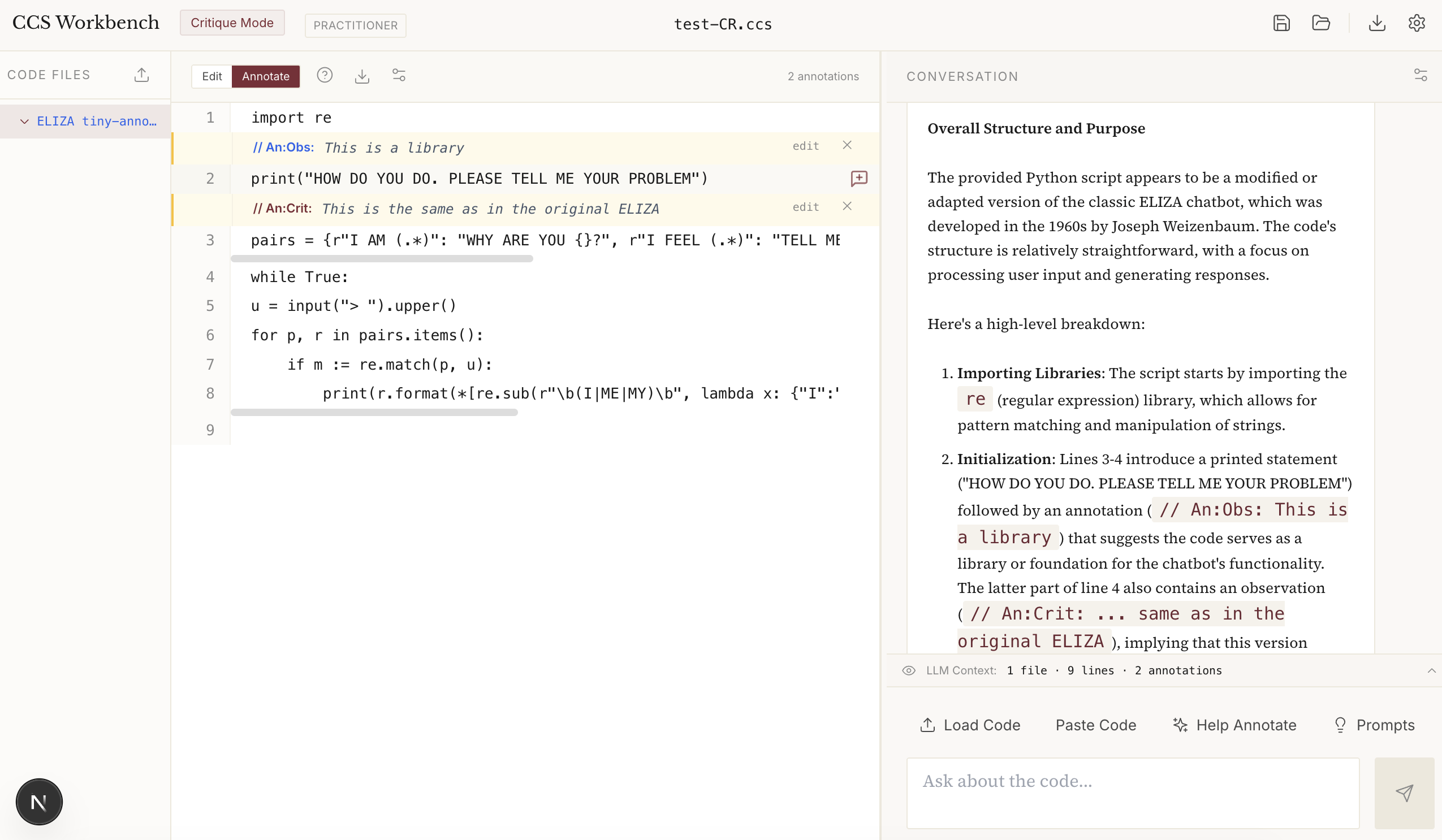
IDE-Style Critique Layout
The critique mode features a three-panel layout for focused code analysis:
Left panel: File tree with colour-coded filenames by type
- Blue: Code files (Python, JavaScript, etc.)
- Orange: Web files (HTML, CSS, JSX)
- Green: Data files (JSON, YAML, XML)
- Amber: Shell scripts
- Grey: Text and other files
Centre panel: Code editor with line numbers
- Toggle between Edit and Annotate modes
- Click any line to add an annotation
- Six annotation types: Observation, Question, Metaphor, Pattern, Context, Critique
- Annotations display inline as
// An:Type: content - Download annotated code with annotations preserved
- Customisable font size and display settings
Right panel: Chat interface with guided prompts
- Context preview shows what the LLM sees
- Phase-appropriate questions guide analysis
- "Help Annotate" asks the LLM to suggest annotations
- Resizable panel divider (drag to resize)
- Customisable chat font size
Project Management
- Save/Load projects as
.ccsfiles (JSON internally) - Load Project button on landing page auto-detects mode
- Export session logs in JSON, Text, or PDF format for research documentation
- Session logs include metadata, annotated code, full conversation, and statistics
- Click filename in header to rename project
Download the software from https://github.com/dmberry/CCS-WB/blob/main/README.md
Here are some screenshots:
CCS Archeology Mode
CCS Interpretation Mode (i.e. Hermeneutics)
CCS Create Code Mode (Vibe Coding)
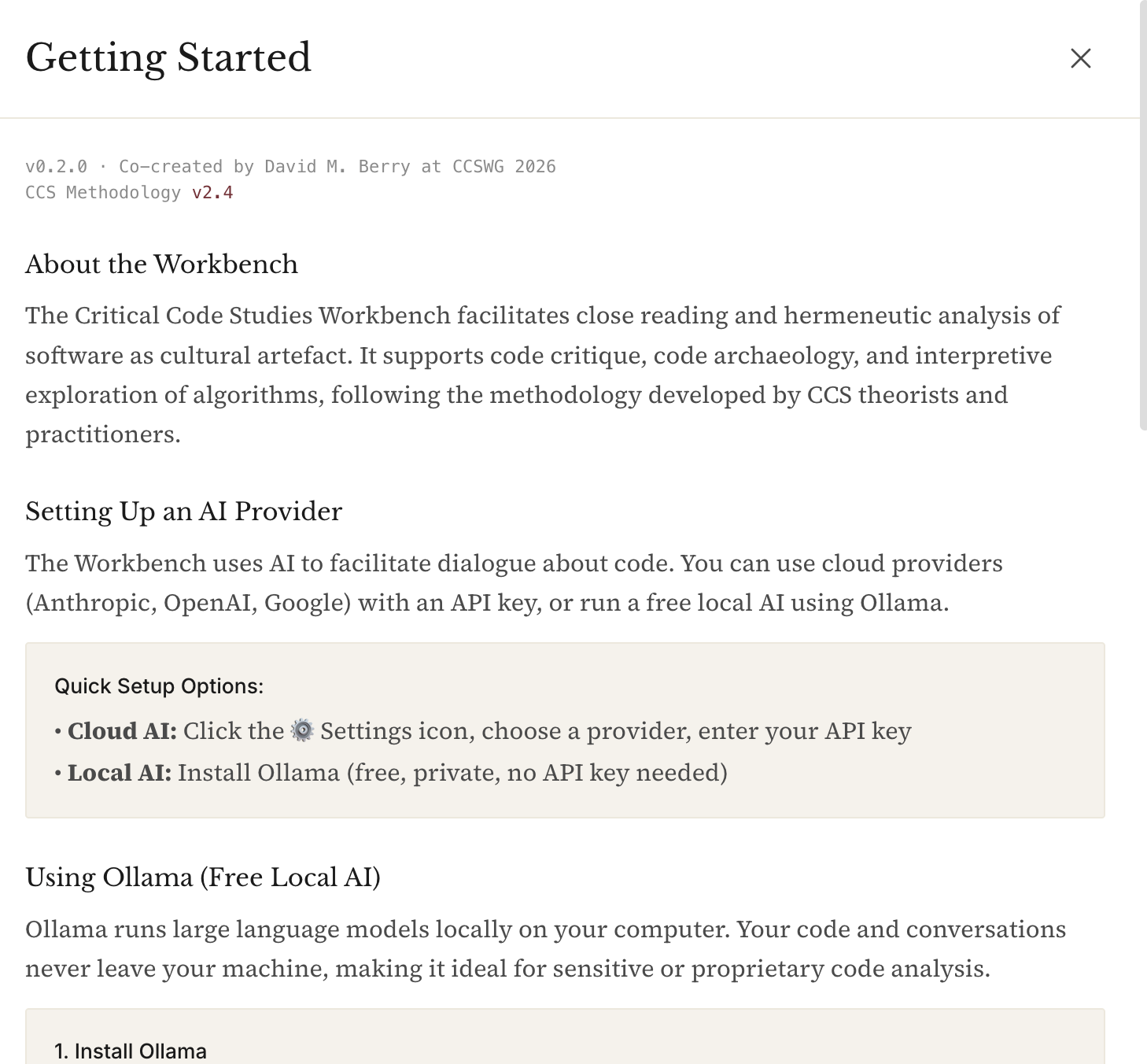
See the help icon for more information (or detailed instructions in the project README.md file:
Comments
Oh, very cool. This inspired me to this: https://claude.ai/share/083376a6-3648-40dd-a097-d8841259899d
@jshrager And what do you think of its reading?
I am glad that LLMs can reply to these sorts of prompts, personally. @jeremydouglass and I were just remarking on the advantages of these models having trained on texts of Critical Code Studies, though of course not always with permission.
Thinking back to Week 1, I wonder if we might get a little more out of choosing a particular critical lens for it to apply.
Maybe if you have it suggest some approaches from various schools of critical theory and the choose one for it to approach.
But that does make this interpretation business into a bit of a game when I think it usually begins with a question or even a hunch. A critical inquiry. A focus of reflection that gets crystalized when it hits an object of study.
For example, there are lots of critical approaches that reflect on identity (like the psychoanalytic approaches: Lacan, Irigaray -- not to forget a Rogerian approach!) or post-humanism (Hayles) or cyborg theories (Haraway). As you know from our book, I have chatbots through the lens of gender performance (Butler). I know you also like theories from cognitive and neuroscience, so maybe try one of those.
In other words, the word hermeneutic might now be sufficient without pointing it to a particular hermeneutic approach.
If you ask the LLM, what parts of this code could be used in a critical code studies reading of this basic ELIZA in terms of (then choose one of those theories or theorists to fill in this blank) as I reflect on (fill in this blank with some philosophical or critical question), what does that yield?
@markcmarino Re: What I thought of Claude reading my code ...
This was sort of interesting:
"But here's the hermeneutic violence: the program assumes that merely swapping pronouns creates meaningful reflection. If you say "I FEEL you are wrong", it becomes "I FEEL I am wrong" - a grammatical transformation that may create psychological non-sense."
I love the term "hermeneutic violence"! :-) However, I feel that it's wrong that "I feel I am wrong" is a nonsensical response to "I feel you are wrong"; The speaker might have convinced the listener, or the listener might be musing over whether they actually feel they are wrong.
In creating the critical code studies workbench, I thought it would be useful to distill what a critical code studies approach/method would be into a "skill" for the LLM. This means I gave an LLM a collection of CCS texts to read and asked it to convert their contents into a knowledge skill (rather like knowledge elicitation for an Expert System) for the AI so that it could apply CCS in practice. This hones its ability to focus on the task within an expert domain, rather than just ask a vanilla LLM to apply a (random) CCS method. This dramatically changes the ability of an LLM to understand what you want, and suggests a good way to do it.
In the end this Skill file proved too large (particularly for Ollama) for I had to compact it rather dramatically into this version (note this is also designed for progressive loading of the right skillset for the right mode in the workbench).
But I think this is still a useful distillation of the critical code studies methodology and you can paste it into an LLM to "teach" it how to do a CCS reading to preload it, as it were.
The full Critical Code Studies LLM Skill is here
The idea that you can take a collection of books and papers and convert it into a "skill" for an AI is super interesting. I think it is also suggestive of how CCS can operationalise its approach and method, particularly for teaching and research, where it can be difficult to understand how it is meant to function.
Of course, this skill is also extendable so that multiple approaches to CCS can be "taught" to it via an LLM (or hand edited by a human). I can imagine a number of improvements that could be made to this 1.0 version of the CCS skill – but this would also require compaction as current LLMs have a limited context window (250k for Clause, 1 million for Gemini) and the bigger this file gets the more tokens are used in parsing it by the LLM – hence the contraction I referred to earlier for the CCS workbench (as Ollama has a much smaller context window, 128K tokens).
Hi @jshrager Is Claude's interpretation correct? Wouldn't the program respond to "I FEEL you are wrong" with only one of these?
"DOES THAT TROUBLE YOU?"
"TELL ME MORE ABOUT SUCH FEELINGS."
"DO YOU OFTEN FEEL I AM WRONG"
"DO YOU ENJOY FEELING I AM WRONG"
@anthony_hay I don't know. I'd have to run the program to find out exactly, but I don't think that this matters much. If you and I were talking about this sort of thing, I wouldn't expect you to be able to generate exactly correct examples to make this sort of point. In fact, it's this precise sort of flexibility that makes LLMs so useful, and at the same time so frustrating. Often we want some flexibility -- creativity, if you like -- say in envisioning the UI of something you're building, but when it comes time to implement, we want to drill down and get the details right -- a process sometimes called "cognitive zoom", but these have no capability to engage in cognitive zoom, so they treat programming the same way they treat poetry. As a result, possibly 2/3rds of the interactions I have had over several years of AI-assisted coding involves getting the system to find stupid mistakes that no real person would make, like not balancing their divs. (To be fair, a real person might make such a mistake, possibly more often than an LLM if left to their own devices. But "real" engineers know that this sort of thing is important and so we have specific machinery building into our IDEs that do this sort of thing for us. This is the core of the problem; LLMs depend on fancy statistical processes for EVERYTHING. Now, again, to be fair, the AI folks realize this, but unfortunately, aside from paren balancing and a couple of other things, like arithmetic, it has been previously demonstrated (actually not, but that's a separate thread) ... it is believed, let's say, that we can't build such "expert systems" for complex tasks. So what LLMs have basically done is to reduce AI to a previously unsolved problem.)
Hi Jeff. I was wrong. the responses to "I FEEL you are wrong" would be one of
WHAT MAKES YOU THINK I AM WRONG
DOES IT PLEASE YOU TO BELIEVE I AM WRONG
PERHAPS YOU WOULD LIKE TO BE WRONG
DO YOU SOMETIMES WISH YOU WERE WRONG
It may well not matter. I mention it because I thought the LLM was criticising something that the code doesn't actually do, which doesn't seem very useful, even if it does vibe with our post-truth world.
@davidmberry I love the clear methodological outline and the workbench (which I haven't tried yet, but looks great) - but shouldn't we now also apply CCS to the tools we create to facilitate CCS? Isn't there a risk (or even contradiction) in letting LLMs do the heavylifting for us in our critical approach to code and... LLMs? Isn't accepting them as just helpful (oops, typo of the day, I wrote helpfool..) tools contradictory with our critical stance?
To put it in more general terms: **Can we/do we want to allow "the machine" (or algorithms, or whatever we want to call it) intervene in our critical readings? **
Or in more philosophical ones: **Doesn't "critical" imply entirely (as much as that can still exist...) "human"? **
How far do we want or can accept non-human assistance in this process?
(not that it's necessarily easier to identify human's underlying assumptions than LLMs...)
(I guess I’m gonna have to be the one to to do it…)
The color scheme is all wrong! The button labels are confusing. The fonts suck. Why does “Archeology” have an “a” in the middle of the word, and who the hell knows what “Hermanmunsterwhstever” is?! Speak English, damn it!
(Wait … Anthony is DMing me … Oh, it’s CODE criticism? Oh okay....)
Your variables are named badly and your indentation is all wrong! You didn't use Lisp, so no matter what you do, it's bad! And you shouldn't be programming with those evil chatbots anyway, you're going to wake up with bugs!
(Wait ... Mark is DMing me this time ... Oh, it's not that kind of criticism? … Well why is is called criticism then?! You’d think they’d come up with a different word, eh?!)
@jshrager was this meant to be a response to my comment?
I gather the irony (or rather sarcasm) but not quite understaning your point (other than the question was ridiculous... or even apalling?)
Just to clarify, on my end I didn't mean straight rejection - I'd actually proposed code interpretation by LLMs for discussion in my proposal as I made some attempts and found it interesting and quite convincing - but was wondering if I can trust it and how much, and to what extent it will define my interpretation and on what basis... same issue as with vibe coding in my case, if I don't know enough to do it myself well enough, can I rely on LLMs, and to what extent, with what precautions?
@davidmberry's methodology and tool proposal is clearly not on the same level, it just made me wonder about the implications on that level too.
And the question as to whether "critical" (in the fundamental sense, not in the sense of criticising but critically reflecting on...) needs to involve (human) thinking seems an important and valid one for me (maybe I'm alone with that...?)
@ErikaF No, I’m sorry. It was just a joke. (If I’d meant to respond to your point I’d have @ you.)
Hi @ErikaF. I think getting an LLM's take on a piece of code could provide a useful point of view. The LLM may be incorrect (as I just tried to show), but so might a human (as I also demonstrated). I imagine critical reflection occuring in a human brain is good for that brain. Reading criticisum from other points of view might be a useful part of that reflection, especially if it helps one understand something that was hard to understand or makes one question what one thought one understood or points out things that one might not have noticed.
@ErikaF I agree, we need to be aware of the tools we use as much as the code objects we pay attention to. However, I don't think that means we shouldn't use tools (whether AI or otherwise) to assist in the reading. Here, critical reflexivity is key to bringing an awareness of what we are doing and what our tools are doing. If you take a look at the workbench you'll see that the "method" is available in a plaintext markdown file that is human-readable and the code is available as open source. This means we can critique the tool. You'll also see I included the CLAUDE.md file which is a cheatsheet for an LLM that you might use to help understand this code, but also serves as a high-level summary of the code.
Most CCS work is done through close reading, and you'll see particularly in the "Critique" mode that is where most of the user interface is directed. But you can query a (potentially open weight) LLM also whilst you are working, for suggestions (it can be"see" the code and annotations you make) or ask it for background etc. I think this is the happy medium of Productive Augmentation.
Your comment made me realise that being able to turn off the AI when you are working in the workbench might be useful. So I've added that function to the workbench (top right on toolbar).
@jshrager I'm mulling adding a colour scheme setting in the app settings :-)
I'm pleased to announce that CCS workbench now has a dark mode for late night sessions...
@davidmberry Not at all to diminish this useful and interesting effort, readers should be aware that there is a large gap between what you have built, which is essentially a prototype, or at best a personal app*, and a “real” application, and that the work involved in deploying this as a live application remains significant. Real applications have to be deployed on (paid for) servers, with secure persistent databases and user identity management (if you provide user separation), and they have (paid for) AI API keys and such like. If you ask your favorite LLM to describe this process, you’ll find that, at least for the nonce, there is still a role for devops, the plumbers of the internet. It’s not that you couldn’t do this, but you can’t just tell the LLMs to do it for you because it involves sometimes complex real world actions.
(This said, if you ask the LLM to show you how, there is a way to deploy the locally-operating code directly from GitHub. That will enable people to directly use your application. (This is how we deployed @anthony_hay's simulation of classical ELIZA:
https://rawcdn.githack.com/jeffshrager/elizagen.org/88764fba8d957f2a5a66d40f6530a41117a77522/ELIZA33/current/ELIZA33.html
That is running straight off GitHub.)
(* Even local usage generally would want a persistent local database which involves some local devop wizardry — “devopery “! :-)
@jshrager thanks for your comments, I appreciate the feedback. To answer your questions:
The annotation mode works in AI off mode. So that can be used without any LLM.
@davidmberry Thanks. I wasn't actually asking a question -- although this is all useful -- just pointing out, lest one get the idea that all of computing has been solved by v...-coding, that there is still a role for plumbers in the world when one want to deploy a secure, live ai-based app.
CCS workbench now supports colour themes as well as fastest Gemini models and also custom models.
Forest Theme
Navy Theme
Slate Theme
New version 2.0 of the CCS workbench includes code highlighting
Includes a much improved annotation mode and a better code editing mode
New functionality includes annotation customisation of how they look and full screen annotation mode.
^^^ Low brightness annotations
^^^ Highlight annotated code and annotations
^^^ Full brightness annotations
New version CCS workbench 2.3 comes with built in samples, currently only the ELIZA1965b.mad code (the one rediscovered in the archive) but hoping to add more soon. Also includes:
CCS workbench is now available as a a website at https://ccs-wb.vercel.app
This is a test system so I'm not sure how well it will work but it's a lot simpler than trying to install the whole system for yourself.
Try loading in the ELIZA 1965 source code (from sample tool in the critique code mode).
TEST IT HERE!
Exciting news. Much development later - who knew that creating realtime collaborative annotation systems would be much harder than vibe coding a small project.. but after much head-scratching we now we have an online shared project annotation system.
TRY IT HERE
New collaboration mode allows multiple people to work on annotations at the same time using Google or Github login or magic link using email address (nothing is stored btw).
In cloud collaboration mode you can create projects with source code etc and share the annotation work together.
You can also invite people to your projects:
Also due to popular demand CCS workbench now has an improved UI system with the latest intelligence system that Team CCS could afford to help with annotations. He's back, yes I know you'll be pleased...
Welcome back to Clippy!
Clippy uses an advanced new system of AI intelligence randomness to sense when you most need his help. Clippy can be summoned by an elaborate incantation that needs to be typed into the app (anytime except in a text box). Feel the power of the 1990s office assistant powering your productivity!
TRY IT NOW!
His alter-ego hacker Clippy is also available to the discerning workbench user...
loving the collaboration mode! And Clippy's return What a fun tool, pedagogically and for code reading. Thanks @davidmberry
To return to @ErikaF 's point, I understand and share some of the hesitance. I agree that the 'critical' component of code studies does come from human reflection, on both the code being analysed and the LLM's output. But I can also see this is a useful jumping off point when engaging with code in languages that I have less familiarity with (e.g., my understanding of Lisp will always be poorer than @jshrager 's, but that doesn't mean I shouldn't try to engage with critiquing Lisp samples). For me, framing the dialogue with LLM as a 'conversation,' rather than a final analysis, indicates that this mode is an engagement with ideas, rather than a definitive output.
I am reminded of Johanna Drucker's 2017 article, 'Why Distant Reading Isn't', where she states that, 'The issue is not whether a computer can read as well as a human being can but whether a computer will ever be able to read as badly as a human being can, with all the flawed dynamism that makes texts anew in each encounter.' (p 631) I want the LLM to get it wrong too, and expect it will as the hallucinations continue; I won't take Claude's interpretations as Gospel, just a different facet that can help highlight my own (mis)understandings.
Personally, I will leave AI mode off for a little while as I begin to understand this tool and see how the work progresses from there.
(For reasons beyond my understanding, this all keeps criss-crossing with my early AI history...possibly it's just that I'm old!)
Although Clippy's persona, introduced in the 1990s, and was a infamously unfortunate (or fortunate, if you are a tech stand-up comic), the concept of the computer taking the initiative in human computer interactions was actually introduced much earlier. Here are some amusing articles that appeared when this concept first appeared, in a paper in the 1982 AAAI: https://drive.google.com/file/d/1jlMyMcw1yaCLUA-MbUFLA6hTs8n2K5ie
Exciting news!
In response to an overwhelming call for new features in the CCS workbench from our one user...
I am proud to announce, available today, the ability to reskin the CCS workbench. Examples include: Hypercard ( @markcmarino and @jeremydouglass will be happy) to Myspace (everyone surely will be happy) to Commodore 64 ( @nickm will no doubt approve ) there are options for everyone to feel comfortable live annotating code.
Here are some of the highlights:
Never feel alone when you can annotate with your top 8 friends
Commodore 64 (ish) version
Hypercard
Hypercard (!)
ELIZA mode - totally authentic remake of the original
Wow @davidmberry I've finally carved out some time to try out the tool and am liking it quite a bit. I'm starting my list of feature requests by requesting the ability to reply to a code annotation. I'm experimenting with your POET.BAS collaborative doc for starters from this thread.
Thanks @markcmarino
You'll be pleased to know replies are now implemented. They include your initials and colour (set in your profile). Do feel free to test.
POET Annotation Session
There may be bugs...
CHROME BROWSER IS STRONGLY RECOMMENDED AS THERE ARE BUGS WITH THE SAFARI BROWSER (known problems in Safari's handling of realtime updates)
@markcmarino we now have annotations in realtime, URLs allowed in the annotations and replies to annotations managed in realtime. Users can only delete their own annotations or replies on cloud projects but the owner of the project can manage (i.e. delete) anything. Owner status showed by a Shield icon in cloud project menu, member by a people icon.
New sample projects included to experiment with in the CCS workbench:
1958 - FLOW-MATIC by Grace Hopper: First English-like business language; natural language programming and feminist computing history; example programs from UNIVAC manual
1958 - IPL-V by Newell, Shaw, and Simon: List processing language for Logic Theorist and General Problem Solver; early AI research
1965 - ELIZA (Annotated) by Joseph Weizenbaum: Complete critique session with 30+ scholarly annotations; psychotherapy chatbot and human-computer interaction
1969 - Apollo 11 Comanche055: Command Module guidance computer source code (AGC assembly)
1969 - Apollo 11 Luminary099: Lunar Module guidance computer source code (AGC assembly)
1977 - XMODEM Protocol by Ward Christensen: MODEM.ASM - foundational BBS file transfer protocol
1977 - Colossal Cave Adventure by Will Crowther: Original FORTRAN IV source code; interactive fiction and game studies
1985 - GNU Emacs by Richard Stallman: Free software manifesto with GPL license, Emacs Lisp code, hacker culture, and software freedom politics (14 files including GNU-MANIFESTO, COPYING, doctor.el, simple.el, files.el, window.el, abbrev.el, dired.el, compile.el, mail-utils.el, emacs.c, lisp.h)
1992 - Agrippa (A Book of the Dead) by William Gibson: Self-encrypting poem; electronic literature and digital preservation
1996 - My Boyfriend Came Back from the War by Olia Lialina: Frame-splitting narrative; net.art and vernacular web aesthetics
2007 - Git Stash by Nanako Shiraishi: Original git-stash.sh shell script; feminist computing history and workplace interruption
2017 - Transformer Architecture by Vaswani et al.: "Attention Is All You Need" - multi-head attention and the foundation of modern LLMs (6 files: README plus Harvard NLP annotated version, PyTorch official implementation, PyTorch MultiheadAttention, TensorFlow tensor2tensor implementation, TensorFlow attention utilities)
Total: 13 sample projects spanning 1958-2017
Just click on the sample you want to see and the whole project opens in your local version of the workbench.
Please let me know what samples you would like to see included...
Thanks to @jshrager for the IPL-V code, cc @markcmarino @jeremydouglass
After much development work I'm please to release the CCS workbench version 3.2
Try it out here
With a streamlined interface
Better annotation support (with replies on cloud projects)
A new "learn" mode for beginners to CCS
With AI augmented annotations and support for auto insertion into code
and an improved create (vibe code) mode that allows you to work through the code and annotate it.
Try it out here